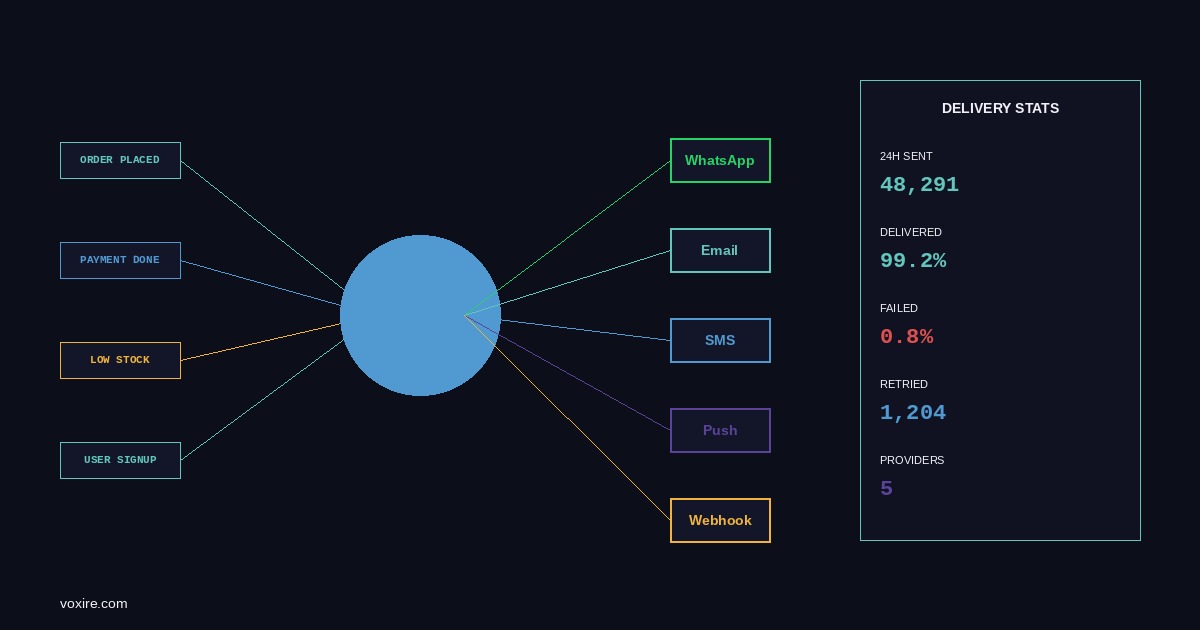
In MENA, WhatsApp has overtaken email as the default channel for transactional messages. Here is the architecture Voxire built for RTYLR to support multi-channel notifications with delivery tracking and automatic retry in Go.
The Channel Problem in MENA SaaS
In Lebanon and across MENA, WhatsApp has overtaken email and SMS as the default channel for transactional messages. A restaurant chain in Beirut sending order confirmations via email alone loses a significant portion of read rates. Users in this market check WhatsApp within minutes of receiving a message; email inboxes may go unchecked for hours or days.
This is not a preference that SaaS products can ignore. Building a notification system that routes to the right channel per user preference is a first-class engineering concern for any product operating in this region. It was a core requirement for RTYLR from the beginning. The implementation took three iterations before the production version settled into its current shape.
Why Single-Channel Systems Fail in MENA
The failure mode of single-channel notification systems in MENA is channel-specific and predictable.
Email-only systems have low read rates for consumer-facing messages. For B2B restaurant management dashboards where the recipient is an operations manager, email is acceptable. For customer-facing order confirmations, it is not.
SMS-only systems have reliability problems that vary by country and carrier. In Lebanon, SMS delivery from international aggregators is inconsistent depending on carrier routing. The same aggregator may deliver reliably to one local carrier and drop 30% of messages to another. In Gulf markets, SMS delivery from non-registered senders is increasingly blocked as regulators tighten sender ID requirements.
WhatsApp-only systems have a different constraint: the Meta Business Platform requires pre-approved message templates for outbound notifications. You cannot send free-form messages to users who have not messaged you first within a 24-hour window. Getting templates approved for a new client adds one to two weeks to the onboarding timeline.
The practical answer is a notification system that supports all three channels and routes based on user preference, with a fallback chain when the primary channel fails.
The Provider Abstraction Layer in Go
The foundation is a Notifier interface that all channel implementations satisfy:
type Message struct {
    To          string
    Subject     string // email only
    Body        string
    TemplateID  string // WhatsApp template name
    TemplateParams map[string]string
    Metadata    map[string]string
}

type DeliveryResult struct {
    ProviderMessageID string
    Status            string
    Error             error
}

type Notifier interface {
    Send(ctx context.Context, msg Message) (DeliveryResult, error)
    Channel() string
}
Each channel (WhatsApp, email, SMS) implements Notifier. The router holds a map of channel implementations and a fallback order:
type Router struct {
    providers map[string]Notifier
    fallback  []string
    db        *sql.DB
    logger    *slog.Logger
}

func (r *Router) Notify(ctx context.Context, userID uuid.UUID, msg Message, preferredChannel string) error {
    chain := r.buildChain(preferredChannel)
    for _, channel := range chain {
        provider, ok := r.providers[channel]
        if !ok {
            continue
        }
        result, err := provider.Send(ctx, msg)
        r.logAttempt(ctx, userID, msg, channel, result, err)
        if err == nil {
            return nil
        }
        r.logger.Warn("notification failed on channel, trying next",
            "channel", channel, "error", err)
    }
    return ErrAllChannelsFailed
}
WhatsApp Business API Integration in Go
RTYLR uses Meta's Cloud API for WhatsApp. The key constraint is template-based messaging for outbound notifications. Templates are defined in Meta's Business Manager, reviewed by Meta, and approved before use. A typical order confirmation template looks like this in the API request:
type WhatsAppMessage struct {
    MessagingProduct string          `json:"messaging_product"`
    To               string          `json:"to"`
    Type             string          `json:"type"`
    Template         *WATemplate     `json:"template,omitempty"`
}

type WATemplate struct {
    Name       string         `json:"name"`
    Language   WALanguage     `json:"language"`
    Components []WAComponent  `json:"components"`
}

func (w *WhatsAppProvider) Send(ctx context.Context, msg Message) (DeliveryResult, error) {
    payload := WhatsAppMessage{
        MessagingProduct: "whatsapp",
        To:               msg.To,
        Type:             "template",
        Template: &WATemplate{
            Name:     msg.TemplateID,
            Language: WALanguage{Code: "ar"},
            Components: buildComponents(msg.TemplateParams),
        },
    }
    body, _ := json.Marshal(payload)
    req, _ := http.NewRequestWithContext(ctx, "POST",
        fmt.Sprintf("https://graph.facebook.com/v19.0/%s/messages", w.phoneNumberID),
        bytes.NewReader(body))
    req.Header.Set("Authorization", "Bearer "+w.accessToken)
    req.Header.Set("Content-Type", "application/json")
    resp, err := w.client.Do(req)
    // parse response, extract wamid for tracking
    return DeliveryResult{ProviderMessageID: wamid, Status: "sent"}, nil
}
Delivery receipts come via webhook. RTYLR registers a webhook endpoint that Meta calls with status updates (sent, delivered, read, failed). The webhook handler updates the notification_logs table with the final status.
Email Delivery With Mailgun or SES in Go
For email, RTYLR uses Mailgun for transactional messages. The Mailgun API is straightforward:
type MailgunProvider struct {
    client *mailgun.MailgunImpl
    from   string
    domain string
}

func (m *MailgunProvider) Send(ctx context.Context, msg Message) (DeliveryResult, error) {
    message := m.client.NewMessage(m.from, msg.Subject, "", msg.To)
    message.SetHtml(msg.Body)
    message.SetTracking(true)
    _, id, err := m.client.Send(ctx, message)
    if err != nil {
        return DeliveryResult{}, err
    }
    return DeliveryResult{ProviderMessageID: id, Status: "queued"}, nil
}
Mailgun provides webhooks for bounce events, unsubscribes, and delivery confirmations. These are processed by the same webhook infrastructure used for WhatsApp delivery receipts. The notification_logs table is the single source of truth for delivery state regardless of channel.
SMS via Regional Providers
For SMS, RTYLR evaluated two providers: Twilio for global coverage and Unifonic for MENA-specific routing. Unifonic has direct carrier connections in Saudi Arabia, the UAE, and other Gulf markets that reduce latency and improve delivery rates compared to routing through a global aggregator. For Lebanon specifically, the picture is more complicated because carrier regulations and infrastructure make any SMS delivery inconsistent.
The provider selection is configurable per tenant, which means a client operating in Saudi Arabia uses Unifonic while a client requiring global coverage uses Twilio. Both implement the same Notifier interface.
type UnifonicProvider struct {
    apiKey   string
    senderID string
    client   *http.Client
}

func (u *UnifonicProvider) Channel() string { return "sms" }

func (u *UnifonicProvider) Send(ctx context.Context, msg Message) (DeliveryResult, error) {
    // Unifonic REST API call
    // returns message ID for delivery tracking
}
Notification Routing Logic
User channel preferences are stored in the database and loaded at notification time:
type UserNotificationPrefs struct {
    UserID           uuid.UUID
    PreferredChannel string // "whatsapp", "email", "sms"
    WhatsAppPhone    string
    Email            string
    SMSPhone         string
}
The router builds a fallback chain based on the user's preferred channel. If the preferred channel is WhatsApp and the send fails, it falls back to SMS, then to email. The chain order is defined per tenant in configuration:
func (r *Router) buildChain(preferred string) []string {
    switch preferred {
    case "whatsapp":
        return []string{"whatsapp", "sms", "email"}
    case "sms":
        return []string{"sms", "whatsapp", "email"}
    default:
        return []string{"email", "whatsapp", "sms"}
    }
}
Delivery Tracking in PostgreSQL
The notification_logs table records every send attempt:
CREATE TABLE notification_logs (
    id                   UUID PRIMARY KEY DEFAULT gen_random_uuid(),
    tenant_id            UUID NOT NULL REFERENCES tenants(id),
    user_id              UUID NOT NULL REFERENCES users(id),
    channel              TEXT NOT NULL,
    template_id          TEXT,
    provider_message_id  TEXT,
    status               TEXT NOT NULL DEFAULT 'queued',
    error_message        TEXT,
    sent_at              TIMESTAMPTZ,
    delivered_at         TIMESTAMPTZ,
    failed_at            TIMESTAMPTZ,
    created_at           TIMESTAMPTZ NOT NULL DEFAULT NOW(),
    updated_at           TIMESTAMPTZ NOT NULL DEFAULT NOW()
);

CREATE INDEX idx_notif_logs_tenant ON notification_logs(tenant_id, created_at DESC);
CREATE INDEX idx_notif_logs_provider_msg ON notification_logs(provider_message_id) WHERE provider_message_id IS NOT NULL;
The provider_message_id index is used to look up records when delivery receipt webhooks arrive. Status transitions follow a defined lifecycle: queued to sent (API accepted the message) to delivered (provider confirmed delivery) or failed (permanent failure confirmed).
Retry Logic With Exponential Backoff in Go
Transient failures are retried with exponential backoff. The retry logic lives in the router, not in individual provider implementations:
func (r *Router) sendWithRetry(ctx context.Context, provider Notifier, msg Message, maxAttempts int) (DeliveryResult, error) {
    backoff := 500 * time.Millisecond
    var lastErr error
    for attempt := 0; attempt < maxAttempts; attempt++ {
        result, err := provider.Send(ctx, msg)
        if err == nil {
            return result, nil
        }
        lastErr = err
        if !isTransient(err) {
            return DeliveryResult{}, err
        }
        select {
        case <-ctx.Done():
            return DeliveryResult{}, ctx.Err()
        case <-time.After(backoff):
            backoff = min(backoff*2, 30*time.Second)
        }
    }
    return DeliveryResult{}, fmt.Errorf("max retries exceeded: %w", lastErr)
}
isTransient returns true for network errors, HTTP 429 (rate limit), and 5xx responses. It returns false for 4xx errors that indicate a permanent problem: invalid phone number format, template not found, unauthorized.
Production Experience: RTYLR Order Notifications
In RTYLR's production deployment for Lebanese restaurant chains, the notification flow for an order confirmation works as follows. When an order is placed, the order service publishes an event. A notification worker picks up the event, loads the user's channel preferences, and calls the router. For most Lebanese customers, the preferred channel is WhatsApp. For the fraction of users without a WhatsApp phone on record, the fallback to SMS or email activates.
The WhatsApp template approval process took two weeks for the initial set of RTYLR templates. Each template is submitted in both Arabic and English. The Arabic template approval is sometimes slower because Meta's review team needs Arabic-language reviewers. Planning for this lead time is part of client onboarding.
Key Lessons From Production
Template approval is a project management constraint. Build time for WhatsApp template approval into every client onboarding timeline. Starting the submission before the launch date is not optional.
Phone number formatting is a constant source of bugs. Lebanese numbers use +961 with various local formats. Gulf numbers use country codes from +966 to +971. Normalize all phone numbers to E.164 format at input time, not at send time. Fixing malformed numbers after they are in the database is painful.
Webhook delivery is not guaranteed. Meta and Mailgun webhooks can be delayed or dropped. Build a reconciliation job that queries the provider API for the status of messages older than 30 minutes that are still in queued or sent state.
Monitor delivery rates per channel per tenant. A drop in WhatsApp delivery rate for a specific tenant usually means their phone number list has gone stale or their sender was flagged. Catching this from metrics is faster than waiting for a client complaint.
Not sure where to start? If your SaaS product needs multi-channel notification infrastructure for MENA users, the Voxire engineering team can design and build it from scratch or extend an existing system. Start the conversation at https://voxire.com/get-a-quote/
Enjoying this article?
Enter your email and get a clean, formatted PDF of this article: free, no spam.
Voxire
SaaS for MENA
SaaS built for the MENA market. Arabic-first product design, regional payment infrastructure, data residency for Saudi Arabia and the UAE, and the B2B sales motion that works in a region where the playbook from San Francisco does not.
Learn more